

Record staking rewards
Staking rewards add new crypto units to your portfolio and may also count as income. If an exchange sync or file import doesn’t include them, add them manually from Add Holdings.
Before you start
Section titled “Before you start”- Select the portfolio that received the reward. You can’t add rewards while a group is selected.
- Have the reward date, crypto ticker, quantity received, and exchange statement available.
- If your statement shows the market value at receipt, keep the value and currency handy.
Step 1 — Open the crypto income form
Section titled “Step 1 — Open the crypto income form”- Open Transactions → Add Holdings.
- In Add manually, choose Record a staking reward.
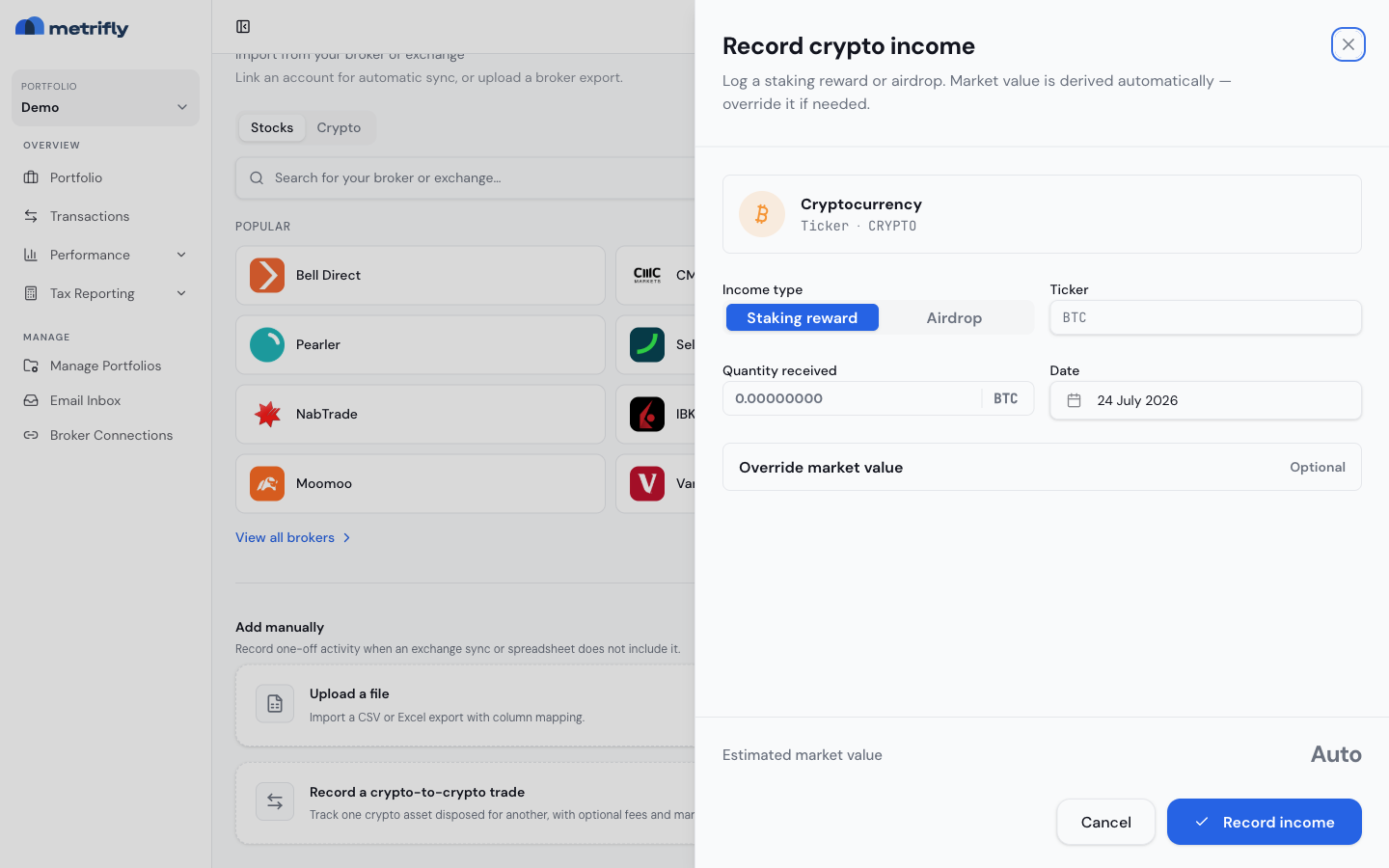
- The Record crypto income form opens.
Step 2 — Choose the income type
Section titled “Step 2 — Choose the income type”Choose Staking reward for staking, validator, earn, or yield rewards.
If you received crypto from a promotional or protocol airdrop instead, choose Airdrop. The same fields apply.
Step 3 — Enter the reward details
Section titled “Step 3 — Enter the reward details”- Enter the Ticker, such as
ETHorSOL. - Enter the Quantity received.
- Enter the Date the reward was credited.
- Leave Override market value collapsed unless you need to use the value from your statement.
- Click Record income.
Metrifly adds the units to the crypto holding. If it can determine the market value automatically, it uses that value for the income amount.
When to use a market value override
Section titled “When to use a market value override”Use Override market value when:
- Metrifly asks for it because the value can’t be determined automatically.
- Your exchange statement gives a specific income value you need to match.
- You need to use a currency other than the default derived value.
Expand Override market value and enter both the value and its currency together.
Good to know
Section titled “Good to know”- Rewards increase quantity. A staking reward adds units to the crypto holding; it isn’t recorded as a cash dividend.
- Income value matters for tax. Use the value at the time you received the reward when you need tax reporting to match your statement.
- Airdrops use the same form. Choose Airdrop instead of Staking reward if the units weren’t earned through staking.
- You can edit rewards later. Open the transaction and update the ticker, quantity, date, or value if your statement changes.
Troubleshooting
Section titled “Troubleshooting”| Problem | Fix |
|---|---|
| Metrifly can’t determine the value | Enter the market value and value currency from your exchange statement. |
| The holding quantity looks low | Check whether all reward batches have been added. Many exchanges credit rewards daily or weekly. |
| The income report doesn’t match your statement | Review the reward date and market value override for each staking reward. |
| You added an airdrop as staking | Edit the transaction and change Income type to Airdrop. |