

Add a trade manually
Sometimes you just need to add one trade — a recent buy, a crypto trade, or a sale you made outside your usual account. This shows you how to record a single buy, sell, or opening balance by hand. By the end, the trade will be in your portfolio and your holdings and performance will update automatically.
If you have a lot of trades to add, importing a file is much faster — see Import your trade history from a file.
Before you start
Section titled “Before you start”- Select the portfolio you want the trade to go into. You can’t add trades while a group is selected — switch to a single portfolio first.
- Have the trade details handy: the date, the ticker, the quantity, and the price.
Step 1 — Open the form
Section titled “Step 1 — Open the form”You can open the manual form from a few places — they all do the same thing:
- Transactions → Add Holdings → Add manually, then choose Add a trade manually — this opens the Add Transaction sheet (the main route), or
- Add Holdings on your portfolio dashboard (including the empty-state prompt when a portfolio has no trades yet), or
- A holding’s Trades tab → Add Holdings (handy when you’re already looking at one security).
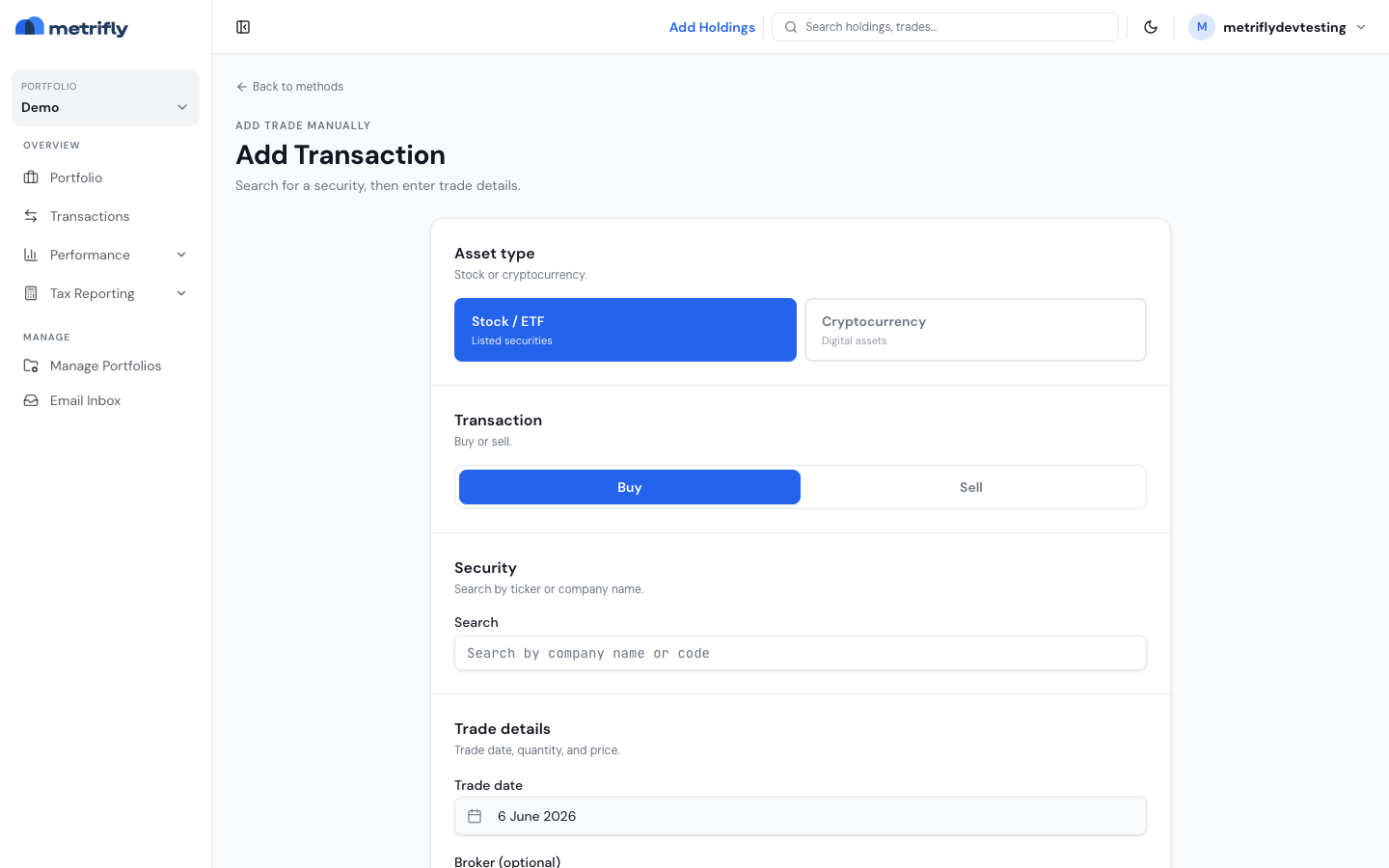
Use the asset type controls to choose Stock / ETF or Cryptocurrency (1), select Buy, Sell, or Opening balance (2), and search for the security (3).
Step 2 — Choose the trade type
Section titled “Step 2 — Choose the trade type”Pick Buy, Sell, or Opening balance on the type toggle. This decides which fields you’ll see.
| Type | What it records |
|---|---|
| Buy | A purchase. Creates a new holding, or adds to an existing one. |
| Sell | A disposal. Realises a gain or loss using your portfolio’s allocation method. |
| Opening balance | A position you already held before you started tracking — the quantity and what it cost you — so your history starts correct without importing every old trade. |
Dividends aren’t added through this form. Metrifly detects them automatically for you to confirm on the Income and Dividends pages, or you can record one from a holding’s Add income.
For crypto-specific activity, use the dedicated manual options in Add Holdings:
| Option | What it records |
|---|---|
| Record a crypto-to-crypto trade | A swap where one crypto asset is disposed and another is received. |
| Record a staking reward | Staking rewards or airdrops that add crypto units to your holding. |
Step 3 — Enter the details
Section titled “Step 3 — Enter the details”Fill in the asset and trade details, then click Add transaction. Metrifly recalculates your holdings and tax figures straight away.
- Search for the security by Ticker (up to 32 characters — Metrifly uppercases it for you) and pick it from the results. There’s no separate exchange dropdown — the exchange comes from the security you pick. Metrifly covers around 26 markets, including the ASX, NYSE, AMEX, NASDAQ, LSE, NSE, BSE, Toronto, Hong Kong, Tokyo, SIX, Euronext, XETRA, Milan, Madrid, the Nordics, Vienna, Singapore, and NZX.
- Enter the Date (
YYYY-MM-DD), Quantity, and Price per unit. - Add a Fee if there was brokerage — it’s included in your cost basis.
- Click Add transaction. A Total preview shows before you submit — Total cost base for a buy, Net proceeds for a sell.
Good to know
Section titled “Good to know”- Foreign currency: if the trade currency differs from your portfolio’s reporting currency, an Exchange rate field appears. Leave it blank to use Metrifly’s rate for that date, or enter your own.
- Crypto swaps have their own form. Use Record a crypto-to-crypto trade when you traded one crypto asset directly for another.
- Staking rewards are crypto income. Use Record staking rewards when rewards don’t sync from your exchange.
- Selling everything closes the holding. If you sell all your units, Metrifly closes the holding and hides it from the active list — but keeps its full history. Buying the same ticker again reopens it.
- Dividends have their own flow. Metrifly detects most dividends for you to confirm; to fill a gap, use Add income on the holding.
Troubleshooting
Section titled “Troubleshooting”| Problem | Fix |
|---|---|
| You can’t add a trade | A group is selected. Switch to a single portfolio. |
| The ticker is rejected | Keep it to 32 characters or fewer, and check you’ve picked the right security in the search results. |
| There’s no exchange-rate field | The trade currency matches your portfolio currency, so no rate is needed. |
| The cost basis looks wrong | Check the date, quantity, and fee, and review your allocation method. |