

Lodge with the ATO myTax report
When it’s time to lodge, Metrifly’s ATO myTax report labels every amount with its myTax item code and lets you copy each one with a click. By the end, you’ll have your investment figures entered in myTax on myGov — or exported for your accountant.
Open the report
Section titled “Open the report”Go to Tax Reporting → myTax Guide. The page is titled ATO myTax Report, with an FY dropdown, Tax settings, and Export in the header.
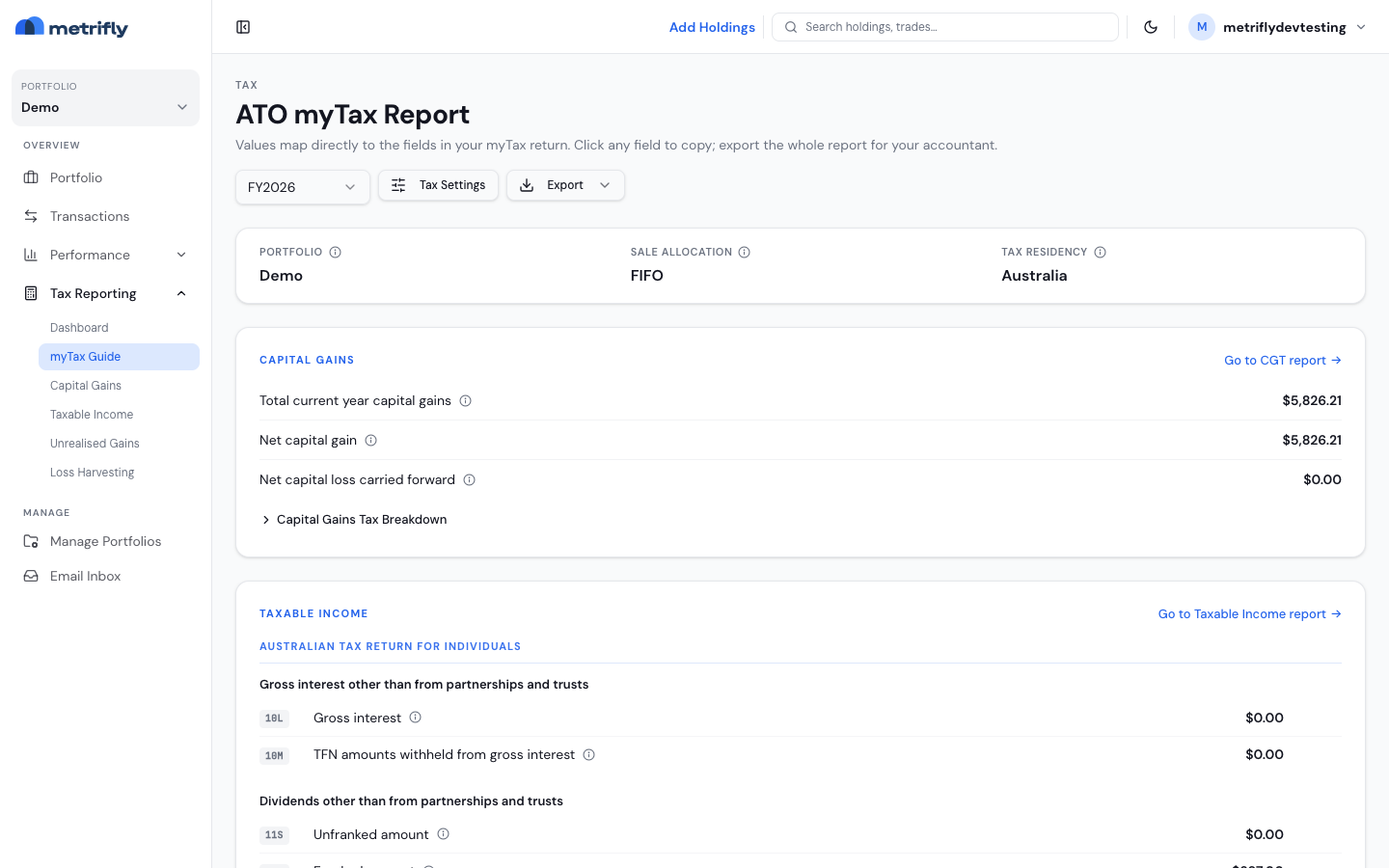
Item codes can change year to year and by return type, so always use the code shown on screen for your selected financial year.
Check the report details
Section titled “Check the report details”The meta card confirms which portfolio, allocation method, and tax residency the report uses:
| Field | What it means |
|---|---|
| Portfolio | The portfolio this report covers |
| Sale Allocation | The default lot method |
| Tax Residency | The jurisdiction (Australian rules for Australian portfolios) |
Capital gains
Section titled “Capital gains”Click any row to copy its amount — a toast confirms the code, label, and value, and the number pastes without a $ sign.
| Row | Typical use |
|---|---|
| Total current year capital gains | Your gross gains |
| Net capital gain | Your assessable gain |
| Net capital loss carried forward | Losses to offset in future years |
Expand Capital Gains Tax Breakdown for the sub-lines, or click Go to CGT report to open your capital gains report.
Taxable income
Section titled “Taxable income”Your income is grouped into sections, each with an item code, label, amount, and tooltip — the same structure as the taxable income report summary. Go to Taxable Income report opens the payment tables.
Lodge with myTax
Section titled “Lodge with myTax”Before you start, make sure:
- Your tax dashboard checklist is clear.
- Your capital gains report reconciles with your broker.
- Your taxable income report reconciles with your statements.
- You’ve gathered any income from outside Metrifly.
Then, in myGov:
- Open myTax for the same year as Metrifly’s FY.
- Open Metrifly’s ATO myTax Report in another tab.
- For each field, read the item code, find the matching field in myTax, click the Metrifly row to copy, and paste.
- Expand the breakdown if myTax asks for more detail.
- Review the summary before you lodge.
Export it
Section titled “Export it”| Format | File |
|---|---|
| Excel | mytax-report-{fy}.xlsx |
mytax-report-{fy}.pdf |
Troubleshooting
Section titled “Troubleshooting”| Problem | Fix |
|---|---|
| Paste doesn’t work | Paste into a numeric field — the value copies without a $. |
| An item code doesn’t match myTax | Confirm the financial year; the ATO renumbers fields over time. |
| The CGT figure differs from the capital gains page | Make sure both use the same portfolio and year. |
| Export fails | Use click-to-copy instead, and retry the export. |