

Run your taxable income report
This report gathers all the income for your tax return — dividends, franking credits, trust and AMIT components, foreign payments, and crypto — and labels the totals with their myTax item codes. By the end, you’ll have your income figures ready to lodge.
Before you start
Section titled “Before you start”Unconfirmed dividends and reinvestments are included in your totals, but you should still review them before lodging. See Confirm your dividends.
Open the report
Section titled “Open the report”Go to Tax Reporting → Taxable Income. Use the FY dropdown to pick your year.
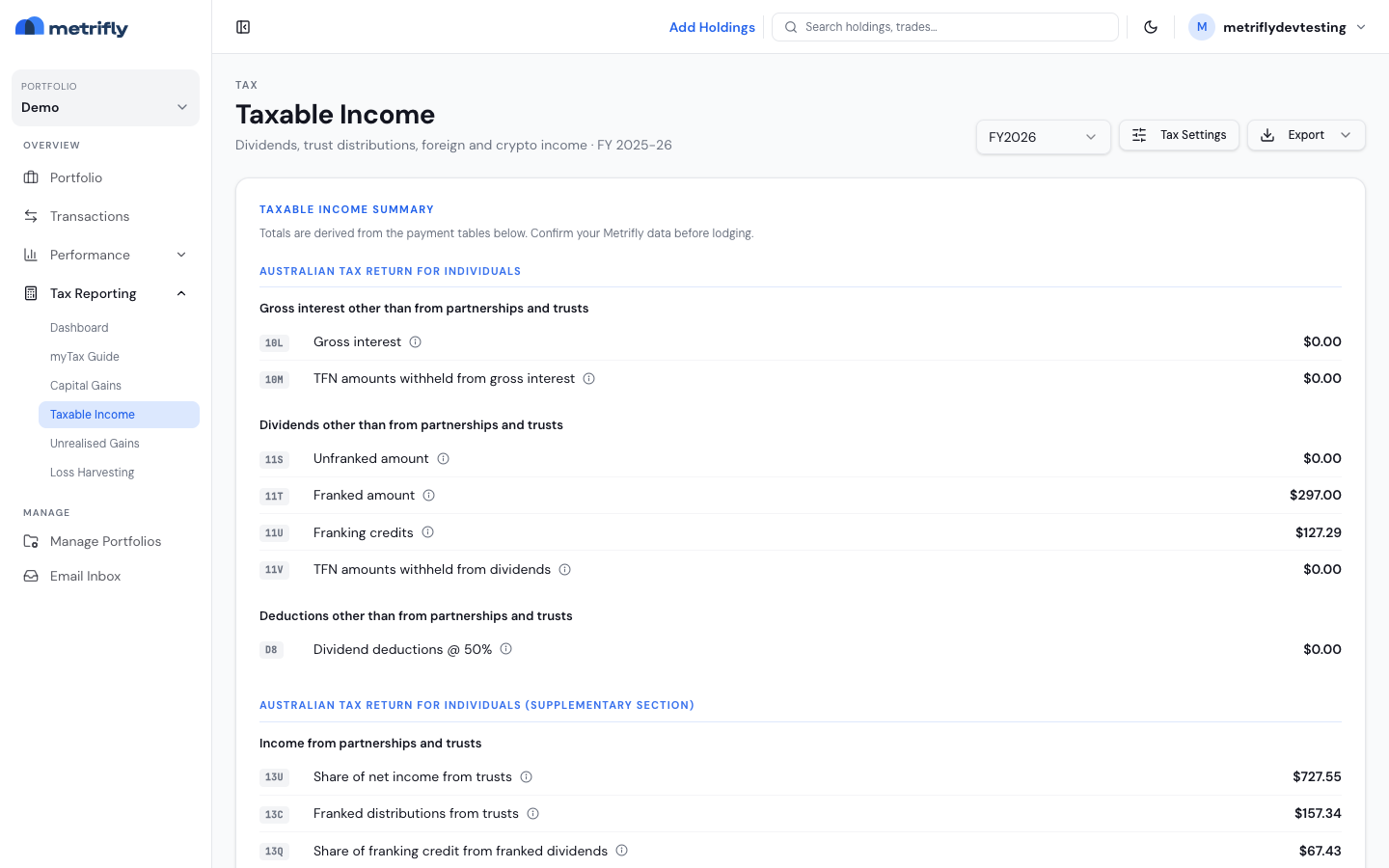
Read the summary
Section titled “Read the summary”The top card lists each item code, its label, and the amount in AUD, with info tooltips. The totals roll up from the tables below, so reconcile your dividends before you lodge. You can copy these values straight into myTax from the ATO myTax report.
Read the income tables
Section titled “Read the income tables”Click any row to open the dividend editor (if you have edit access).
| Table | What it covers |
|---|---|
| Non Trust Income | Australian dividends (non-trust) — total income, net dividend, franked and unfranked amounts, franking credits, interest, AMIT increase and decrease, and foreign source |
| Trust Income | Trust and managed-fund distributions, grouped by holding |
| Foreign Income | Non-Australian securities, with withholding and AUD conversion where it applies |
| Crypto Income | Assessable crypto events, when your portfolio has them |
ETF and AMIT statements
Section titled “ETF and AMIT statements”Funds usually send an annual tax statement after 30 June. Match the AMIT decrease and AMIT increase amounts to that statement. The same adjustments show up on your historical cost basis as AMIT Adj.
Year-end workflow
Section titled “Year-end workflow”- Confirm your dividends through the year — Confirm your dividends.
- After 30 June, compare these tables to your fund tax statements.
- Lodge with the ATO myTax report.
Export it
Section titled “Export it”Download taxable-income-{fy}.xlsx or a PDF from Export.
Troubleshooting
Section titled “Troubleshooting”| Problem | Fix |
|---|---|
| The tables are empty | You had no distributions for the year, or your dividends aren’t confirmed yet. |
| The franking looks wrong | Edit the row or re-confirm the dividend. |
| You can’t edit a row | You have a view-only role on a shared portfolio. |
| The AMIT columns are zero | Reconcile against your fund statement, and check with your accountant. |