

Run your capital gains report
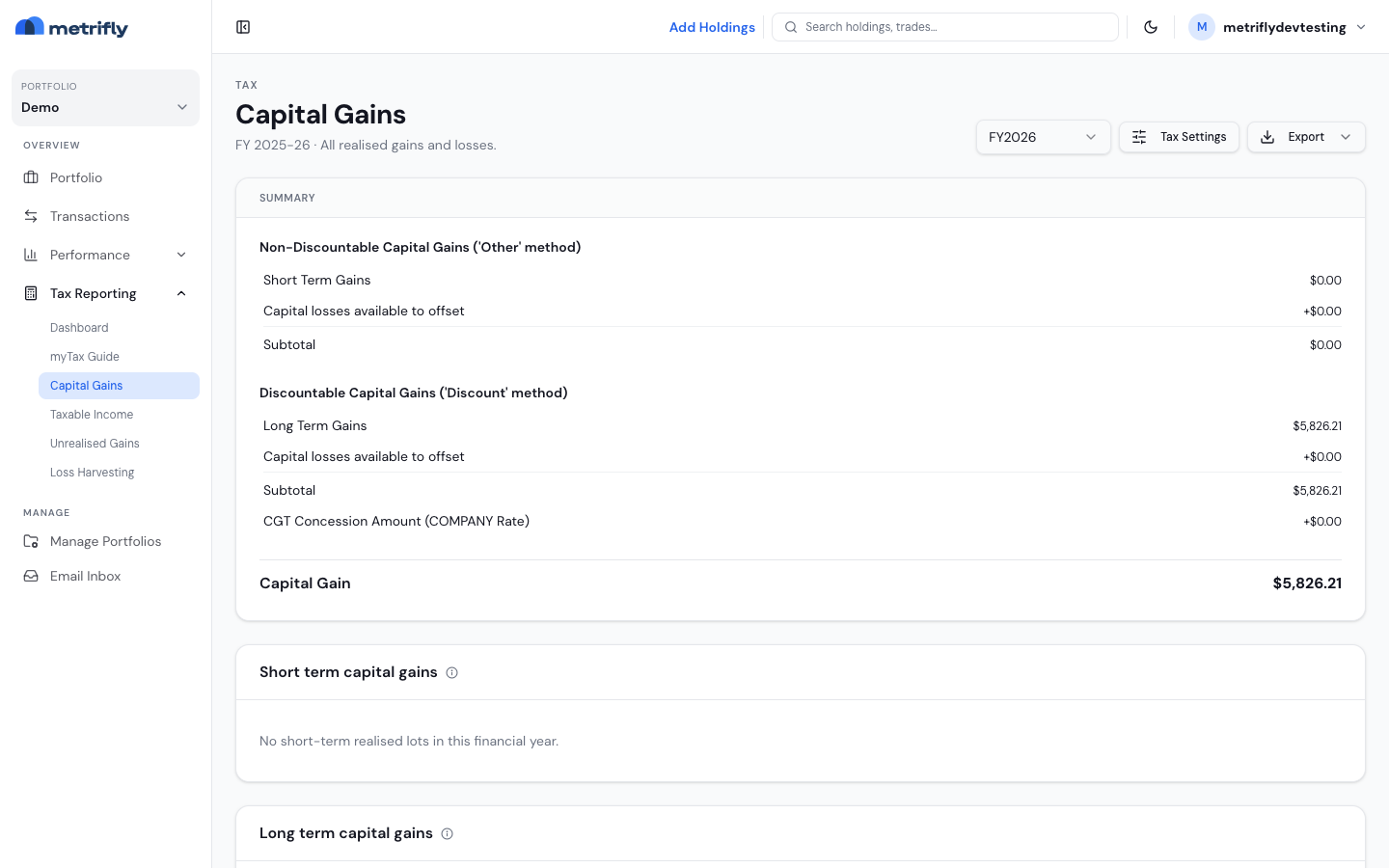
This report shows every sale you made in the financial year, matched to its cost basis and split into short-term and long-term tables, with a summary that rolls up to your net capital gain. By the end, you’ll have a figure ready for myTax and a file you can hand to your accountant.
Open the report
Section titled “Open the report”Go to Tax Reporting → Capital Gains. Use the FY dropdown in the header to pick your year.
Enter prior-year capital losses
Section titled “Enter prior-year capital losses”The Prior-year capital losses section at the top of the report lets you enter the carried-forward losses from your last tax return, or accept Metrifly’s estimate. The estimate is built from your opening carry-forward balance, so check it against your last return before relying on it — the figure you set here is applied against this year’s gains.
Read the summary
Section titled “Read the summary”The Summary card splits your gains two ways:
- Non-discountable (“Other”) — short-term gains, with losses applied, and a subtotal.
- Discountable (“Discount”) — long-term gains, with losses applied, the CGT concession, and your Net capital gain.
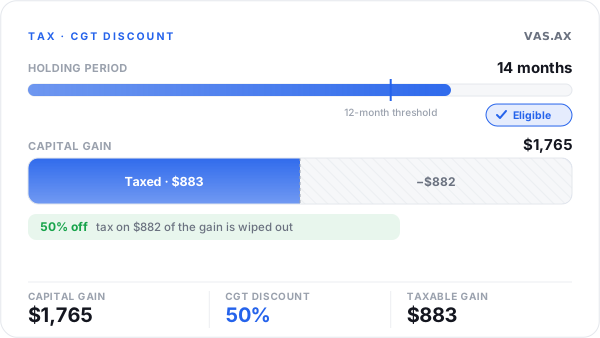
Hold for more than 12 months and, as an individual or trust, only half the capital gain is taxed.
Read the parcel tables
Section titled “Read the parcel tables”| Table | Parcels held |
|---|---|
| Short term capital gains | 12 months or less |
| Long term capital gains | More than 12 months |
Each row shows:
| Column | What it means |
|---|---|
| Symbol | The ticker and exchange |
| Sale allocation method | The method used — FIFO, Minimise CGT, and so on |
| Purchase date / Sale date | The holding period |
| Sold quantity | The units you disposed of |
| Cost basis / Sale value | The amounts in AUD |
| Price gain / Currency gain | Shown when foreign exchange applies |
| Gain | The net gain or loss on that parcel |
How parcels are matched
Section titled “How parcels are matched”Metrifly decides which buy parcels each sale draws from, in this order:
- Your default method from Set up your tax details.
- Any per-holding override for that financial year.
- Specific lots you chose when you recorded the sale.
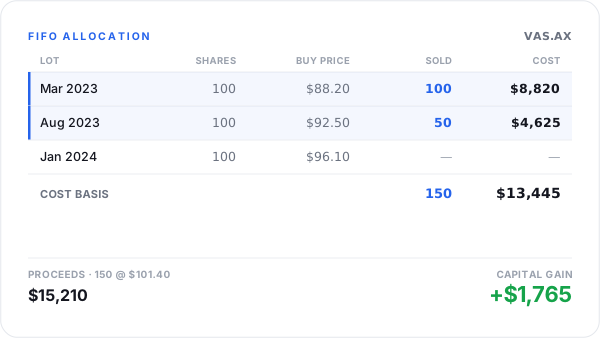
Metrifly shows exactly which parcels each sale is matched against, and the cost base it produces.
Export it
Section titled “Export it”| Format | File |
|---|---|
| Excel | capital-gains-{fy}-{method}.xlsx |
capital-gains-{fy}-{method}.pdf |
Troubleshooting
Section titled “Troubleshooting”| Problem | Fix |
|---|---|
| A sale is missing | Add or import the SELL trade for that financial year. |
| It doesn’t match your broker | Check the dates, fees, and allocation method. |
| A long-term parcel got no discount | Check your entity type — companies get no discount. |
| The tables are empty | You had no sales in that category for the year. |