

Custom investments
Custom investments let you track assets Metrifly doesn’t list in market data — unlisted shares, property, P2P lending, managed funds on unsupported venues, and similar. You define the instrument, record trades like any other holding, and keep unit prices up to date yourself. Metrifly does not fetch market data for these positions.
Create a custom investment
Section titled “Create a custom investment”- Open Transactions → Add Holdings for the portfolio you want the position in.
- Under Add manually, click Create custom investment.
- Fill in the form and click Create custom investment.
Metrifly creates the instrument, your first trade, and a starting manual price, then opens the new holding’s detail page.
Enter a code, country, and name (1), choose whether the investment belongs to this portfolio or every portfolio in your account (2), then add its first Buy or Opening balance (3). Select the matching investment type before creating it.
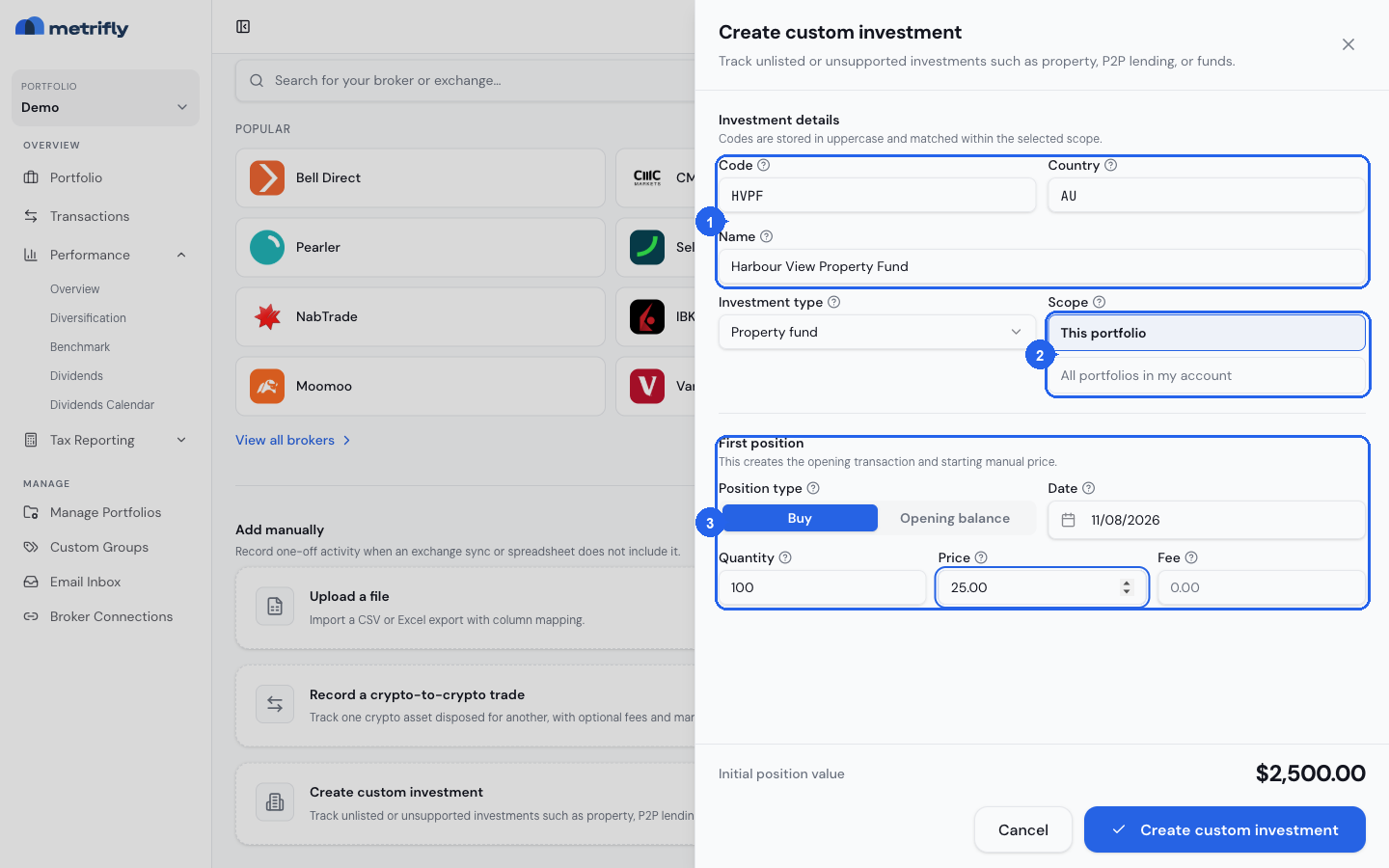
Investment details
Section titled “Investment details”For a new custom investment, enter:
| Field | What it’s for |
|---|---|
| Code | Your short symbol for the investment (stored in uppercase) |
| Country | A 2-letter country code — Metrifly uses this to set the instrument currency |
| Name | The display name shown in your holdings table |
| Investment type | The asset category — ordinary shares, property fund, fixed interest, and others |
If you choose Fixed interest, optional coupon fields appear for face value, annual interest rate, income type, payment frequency, and payment or maturity dates. You can enable Auto-calculate income to save these estimate settings with the investment; Metrifly does not create income transactions from them in v1.
Choose where the custom investment definition lives:
- This portfolio — the instrument exists only in the portfolio you’re adding it to. Use this when the investment is specific to one tax entity or portfolio.
- All portfolios in my account — one shared definition you can reuse across portfolios. When you add the same instrument to another portfolio later, pick it from Use existing instead of creating it again.
When an account-wide custom investment already exists, Use existing (all portfolios) appears at the top of the sheet. Choose it to add a position in the selected portfolio without creating another definition.
Codes must be unique within the scope you choose. The same code cannot exist as both a portfolio-scoped and account-wide custom investment.
First position
Section titled “First position”Every new custom investment needs an opening trade:
| Field | What it’s for |
|---|---|
| Position type | Buy for a purchase, or Opening balance to record holdings you already owned |
| Date | When the trade or balance applies |
| Quantity | Units held |
| Price | Unit price in the instrument’s currency |
| Fee | Optional brokerage or other fee |
This trade creates the holding and seeds the first manual price on that date.
Manage prices
Section titled “Manage prices”Custom investments are valued from prices you enter — Metrifly does not pull live quotes or refresh them on a schedule.
- Open the holding from your holdings table.
- Select the Settings tab.
- In Manage prices, add a dated price row, or edit or delete an existing one.
The latest price drives the holding’s current value and performance charts. Without at least one price, value and return show as unavailable.
Add more trades
Section titled “Add more trades”Record additional buys, sells, and opening balances from the holding’s detail page — open the holding, then use the same trade flows as for listed securities. Custom investments do not appear in global security search; add trades from the holding itself or when creating a new position for an account-wide instrument.
What custom investments don’t support
Section titled “What custom investments don’t support”- CSV or file import — you cannot bulk-import custom investment prices or create customs from a spreadsheet import. Use the create sheet and manual price entry instead.
- Merge into a listed security — if an investment later becomes listed on an exchange Metrifly supports, you cannot convert the custom into that listed security in v1. You would track it separately or migrate trades manually.